From Build Chaos to Reproducibility: A Deep Dive Into Spack’s CI/CD Ecosystem
The Challenge of Managing Complex Build Dependencies
Building software packages for AI and HPC can be a time-consuming and challenging process. A single software package might depend on dozens of other packages, each requiring specific compiler versions, optimization flags, and configuration options.
When multiple team members each need to install the same set of packages, they must independently navigate this complex dependency tree, often spending hours or days recreating identical builds. From a developer perspective, this means significant waiting time before productive work can begin.
From an infrastructure perspective, it means dedicating expensive compute resources to redundant compilation tasks. From a collaboration perspective, it creates the classic challenge of reproducibility: code that works in one environment but fails in another due to subtle build differences.
This results in inefficient usage of resources, delays in software development, inconsistent environments across teams, and overall increasing the cost of product development and deployment.
How Spack Solves the Build Reproducibility Problem
Spack, an open source package manager available freely on GitHub, addresses this challenge by creating “stacks” of pre-built dependencies through continuous integration. These binaries are stored in a centralized mirror, making them available for quick download and installation.
This transforms what was previously an hours-long compilation process into a minutes-long download operation. The system uses hashes of build options to prevent redundant builds. These hashes serve as unique identifiers for each specific build configuration, capturing every detail from compiler version to optimization flags to dependency versions.
When a developer requests a package, Spack checks if a matching build already exists in the cache based on these hashes. If found, the pre-built binary is simply downloaded. If not found, CI jobs are dynamically generated only when necessary, ensuring efficient use of computational resources.
This means that across an entire organization or research community, each unique software configuration is built only once, with all subsequent users benefiting from that initial build effort.
Inside Spack’s CI/CD Architecture
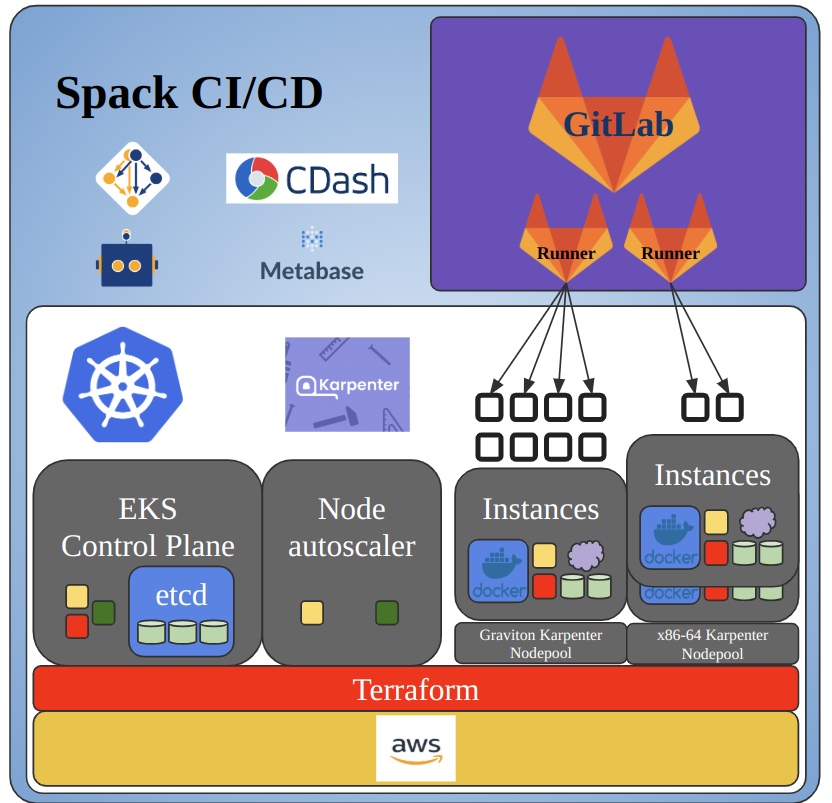
To support Spack’s growing contributor base and increasing build volume, the Spack continuous integration and deployment system leverages GitHub for contributions via pull requests and GitLab for running CI/CD. Much of the continuous integration runs in GitHub through GitHub Actions, but all CI for package builds happens outside of GitHub on a self-hosted GitLab instance (https://gitlab.spack.io).
This approach allows the team to leverage GitLab’s extremely powerful CI/CD pipelines and makes it easier to use custom runner instances tailored for different architectures. The tradeoff is that the system must maintain a mirrored copy of the GitHub repository in GitLab.
This involves propagating branches from the GitHub repository to GitLab to trigger pipelines, as well as posting pipeline statuses back to GitHub so developers can see build results directly in their pull requests.
This GitHub-GitLab separation enables different CI behaviors for different stages of development. On GitHub, pull requests trigger preliminary checks through GitHub Actions. On GitLab, the full package build CI runs on all pull requests and protected branches such as releases and develop.
Each PR branch maintains its own temporary build cache for iteration, while merged changes trigger a protected pipeline that signs binaries and publishes them to the public build cache. The CI infrastructure runs on an AWS EKS cluster, with Linux, Mac, and Windows runners spanning multiple microarchitectures across x86_64 and ARM64/Graviton.
Cloud Infrastructure
Spack’s CI infrastructure is hosted on AWS and on on-premises hardware at the University of Oregon, including Mac runners and Linux runners for less common, HPC-focused systems. We use Terraform for managing infrastructure, allowing for reproducible deployments. Terraform is also used to maintain a parallel staging deployment of the CI infrastructure, which allows us to test changes and run experiments in a Spack CI environment without disrupting production workloads.
Kubernetes
The core components of the Spack CI infrastructure run inside a Kubernetes cluster hosted on AWS EKS. This includes GitLab, SpackBot, and various supporting services such as Metabase and Prometheus.
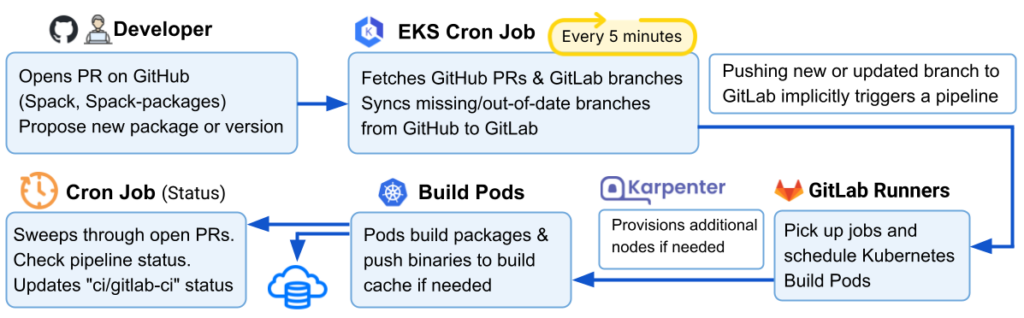
Figure 1: (Top) Cloud-based CI/CD infrastructure for Spack, showing the Kubernetes-managed environment that integrates GitHub, GitLab, autoscaling compute resources, and supporting services to enable scalable package builds. (Bottom) End-to-end workflow illustrating how GitHub pull requests are synchronized to GitLab, trigger CI pipelines, schedule build pods on the Kubernetes cluster, dynamically provision resources via Karpenter, and report build status back to GitHub pull requests.
The workflow that triggers build jobs on the Kubernetes-managed CI/CD cluster is as follows (see Figure 1, bottom):.
- A developer opens a pull request on https://github.com/spack/spack-packages to add a new package or package variant/version.
- A cron job in the EKS cluster that runs every 5 minutes retrieves all open PRs from https://github.com/spack/spack-packages, and all protected branches that currently exist on https://gitlab.spack.io/spack/spack-packages. It checks for GitHub branches that are missing or out of date on GitLab, and pushes updates to GitLab as needed.
- Pushing a new or updated branch to GitLab automatically triggers a pipeline.
- GitLab runners pick up the jobs within that pipeline, and schedule pods to run the builds.
- If the cluster does not have enough capacity to schedule the new pod, Karpenter provisions additional nodes and the pod is scheduled on one of them.
- Each pod builds its assigned package and pushes the resulting binary to an intermediate build cache.
- The cron job then sweeps through all open GitHub pull requests, checks the status of their corresponding GitLab pipelines, and updates the “ci/gitlab-ci” status on each PR accordingly.
Package build caches
Spack users are able to create their own build caches using a variety of backends such as S3, OCI, or the local file system. Kitware maintains a public build cache hosted in S3 that Spack uses by default. This build cache is populated by CI pipelines that run in GitLab and is available for exploration through a UI hosted at https://cache.spack.io/. This site is statically generated once a day by a cron job that crawls the build cache bucket and populates the UI accordingly.
Spackbot
Spackbot is a GitHub robot that helps coordinate Spack development. Upon opening a PR, Spackbot will apply relevant labels to it and attempt to notify the correct maintainer for review. During iteration on the PR, a developer can interact directly with Spackbot on GitHub via a list of commands, such as “@spackbot fix style” or “@spackbot re-run pipeline” to run autoformatting and restart a GitLab pipeline, respectively.
There are two components to it, both of which run in the Kubernetes cluster:
- “Sync script” – cron job that runs every 5 minutes and syncs git branches between GitHub and GitLab, posts pipeline results back to GitHub PR statuses
- Spackbot webhook handler – webserver that receives webhook events from GitHub when a PR is opened or a user runs a @spackbot command
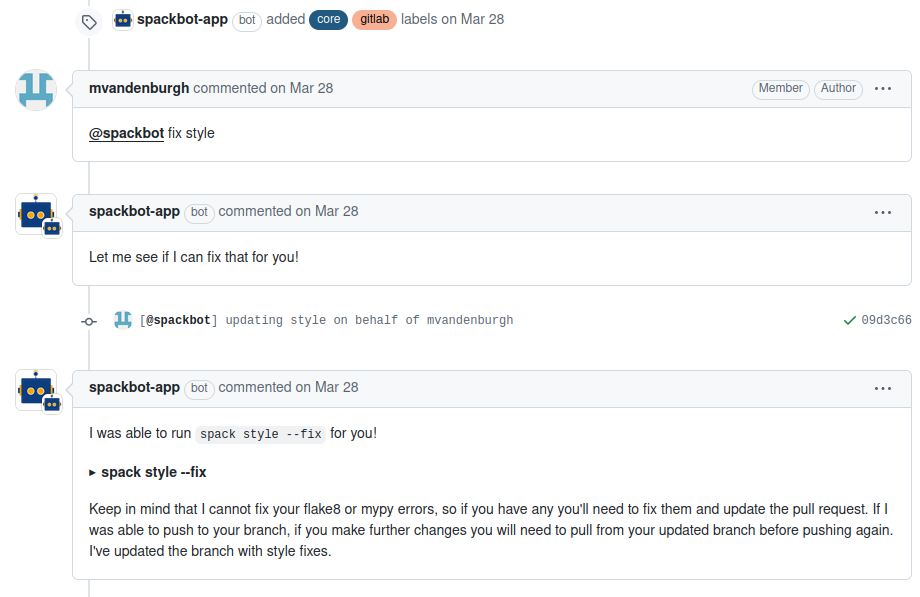
Figure 2: Spackbot’s automation workflow showing how developers trigger style fixes
Karpenter
We use the Karpenter autoscaler to scale GitLab CI runners up and down according to load. This is necessary because the number of jobs running at a given time can vary drastically, and we want to avoid over- or under-provisioning resources. Karpenter is designed to intelligently allocate resources that meet the specifications provided while also minimizing costs. In other words, when a job is enqueued, Karpenter will seek out the least expensive EC2 instance type that fulfills the job’s build requirements.
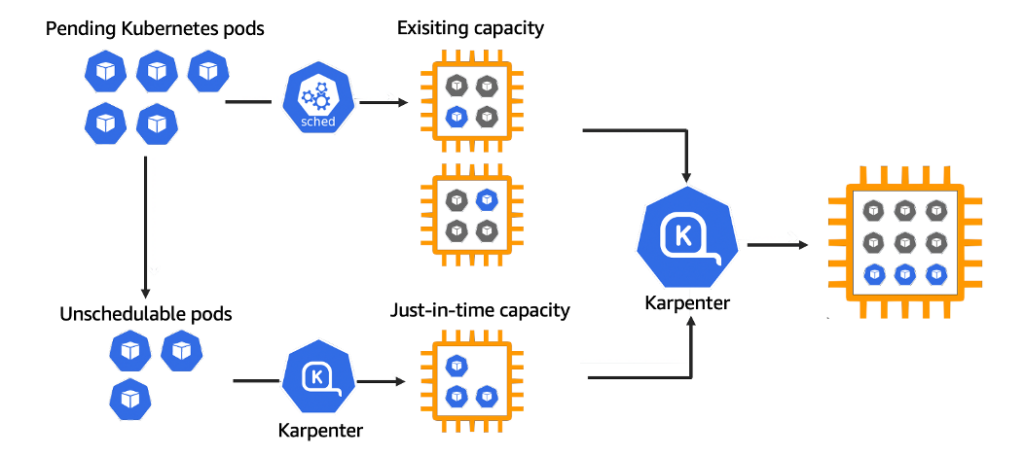
Figure 3: Karpenter dynamically provisioning EC2 instances to meet the resource requirements of Spack’s GitLab CI runners, ensuring efficient and cost-optimized scaling during package builds.
Grafana/Prometheus
We use Prometheus to monitor various metrics such as CPU and memory usage in our Kubernetes cluster. Prometheus runs as a daemon on every node in the cluster and stores these metrics in its internal time-series database. We also host Grafana to use as a front end for visualizing these metrics in predefined dashboards (see screenshot below). This helps ensure pods are being scheduled efficiently, nodes are not overloaded, and resources are not being wasted.
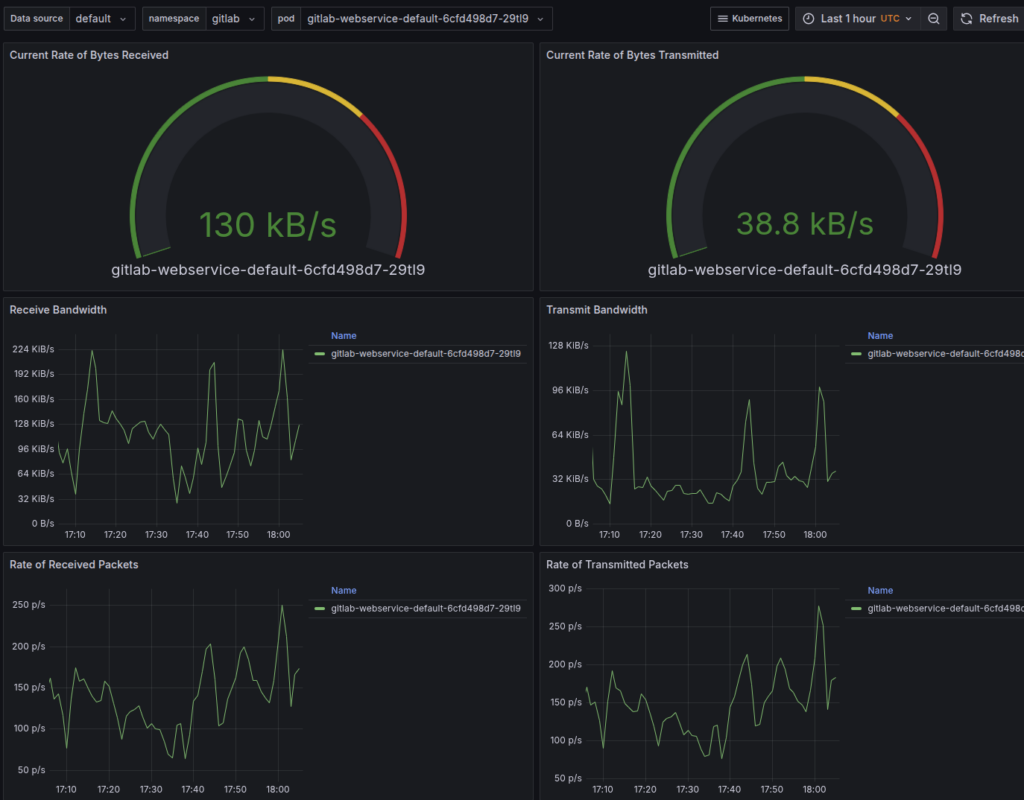
Figure 4: Grafana dashboards visualizing CPU, memory, and pod-level metrics collected by Prometheus, enabling real-time observability of Spack’s Kubernetes-based CI infrastructure
ELK stack
While Prometheus is useful for observing trends over time, sometimes it is necessary to drill down further and examine individual application logs. Logs, and pods in general, are ephemeral in Kubernetes and are lost when a pod terminates. To facilitate storage and analysis of logs, we maintain an ELK stack deployment alongside our Kubernetes cluster.
A Fluent Bit daemon runs on every Kubernetes pod and pushes logs to an OpenSearch cluster running in AWS. We can then use OpenSearch Dashboards to explore these logs, parsing them and then making visualizations out of them (see example below) to gain further insight into cluster operations.
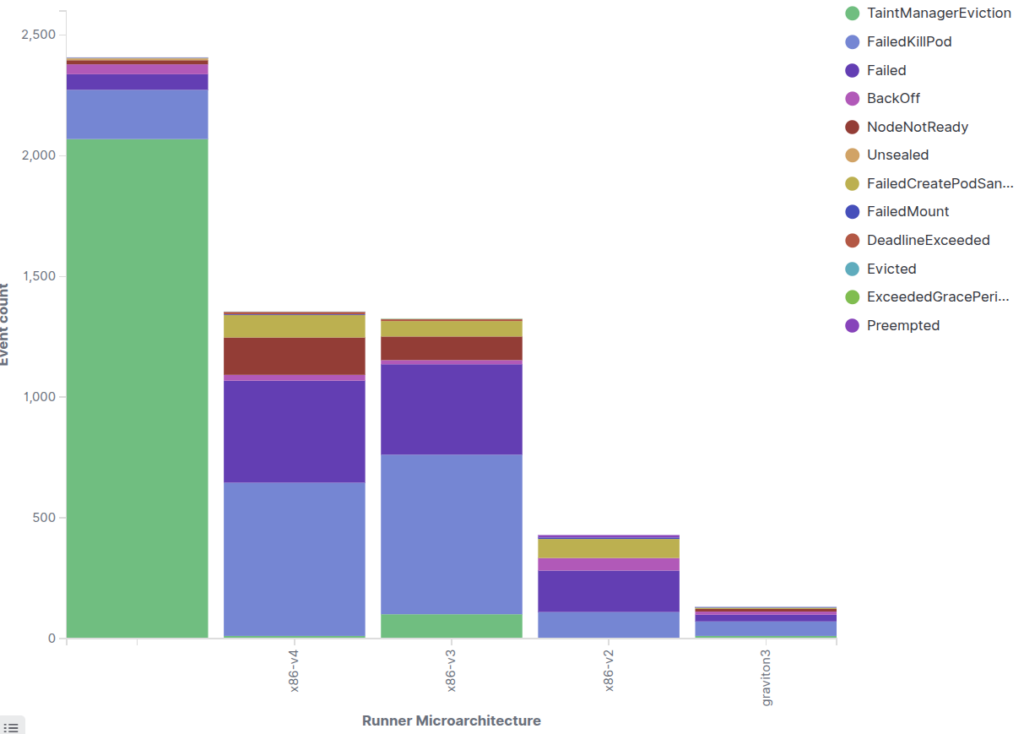
Figure 5: ELK (OpenSearch) dashboards displaying logs collected from Kubernetes pods through Fluent-bit, supporting detailed troubleshooting and cluster-level operational analysis.
Coming Up in Part 2: Cost Optimization and Resource Efficiency
Now that we have covered the architecture behind Spack’s CI/CD system, the next question is: How do we run it efficiently at scale?
In Part 2 of this series, we will explore how Spack optimizes cloud resources, minimizes EC2 costs, and intelligently schedules multi-architecture builds. We will walk through how Karpenter, Kubernetes, and custom scheduling logic work together to ensure that Spack builds run efficiently without wasting compute.
Acknowledgement
We would like to call out Zack Galbreath, Ryan Krattiger, Scott Wittenburg, John Parent, and Aashish Chaudhary for their contributions to Spack-infrastructure development and enhancements to this blog. We would also like to thank our collaborators at the DOE, AWS, and academia for their support and contributions.