VTK the Polyglot
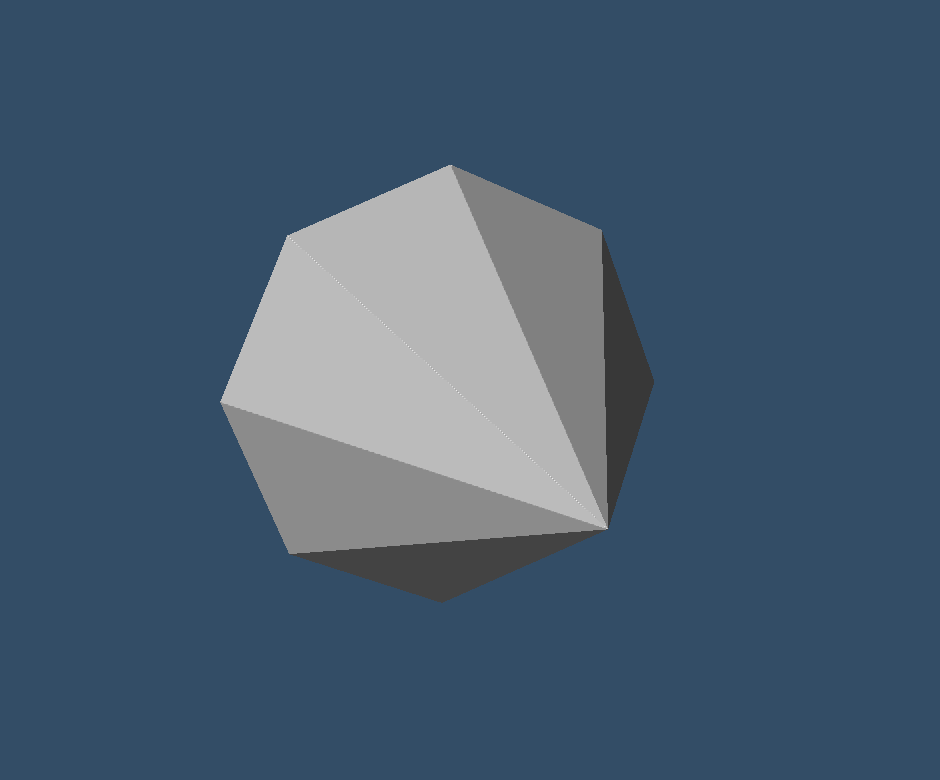
I joined Kitware in 2000. VTK was barely 7 years old. Even then, it supported development in C++, Java, Python, and Tcl. Most of developed in C++ and used Tcl/Tk for scripting and application development. In fact, did you know that ParaView’s GUI was Tk until ParaView 3 (released in 2007)? Anyway, that’s a story for another time. VTK has grown to support many other languages since then. The two big additions being Javascript and C#. Now, whether you’re a C++ veteran, a Python scripter, a JVM enthusiast, a Web connoisseur, or a .NET developer, you can tap into the same powerful visualization pipeline.
Tcl was the original VTK scripting language, integrated with it from the beginning. Unfortunately, Tcl is not so popular anymore and was removed from VTK in 2020. So no more Tcl scripting with VTK (or maybe not, another story for another day).
In this post, I want to show you the same simple example implemented in 10 different languages (plus Tcl). Not to prove a point, but because I think it’s genuinely fun to see how the same visualization pipeline reads across such different language ecosystems.
The Task
We’re going to render a cone. That’s it — a simple cone in an interactive 3D window. It’s VTK’s “hello world,” and the pipeline looks like this:
ConeSource → PolyDataMapper → Actor → Renderer → RenderWindow → Interactor → Start()
Every example below follows this exact sequence. The differences are purely in
syntax and how VTK is accessed from each language. I also stuck to core VTK constructs. There are shortcuts and syntactic sugar in Python and Javascript but I did not use them here.
C++ — The Native Tongue
C++ is where VTK lives. The library is written in C++, so this is the “canonical” version of our cone example. Every other language ultimately calls into this same C++ code.
VTK’s C++ API uses smart-pointer-like vtkNew for object creation, and the pipeline is wired together throughSetInputConnection/GetOutputPort` pairs.
#include <vtkConeSource.h>
#include <vtkPolyDataMapper.h>
#include <vtkActor.h>
#include <vtkRenderer.h>
#include <vtkRenderWindow.h>
#include <vtkRenderWindowInteractor.h>
#include <vtkNew.h>

int main()
{
  vtkNew<vtkConeSource> cone;
  cone->SetResolution(8);

  vtkNew<vtkPolyDataMapper> mapper;
  mapper->SetInputConnection(cone->GetOutputPort());

  vtkNew<vtkActor> actor;
  actor->SetMapper(mapper);

  vtkNew<vtkRenderer> renderer;
  renderer->AddActor(actor);
  renderer->SetBackground(0.2, 0.3, 0.4);

  vtkNew<vtkRenderWindow> window;
  window->AddRenderer(renderer);
  window->SetSize(640, 480);

  vtkNew<vtkRenderWindowInteractor> interactor;
  interactor->SetRenderWindow(window);

  interactor->Start();

  return 0;
}
Source: examples/cpp/cone.cpp
This is about as lean as C++ gets. No manual memory management to worry about thanks to vtkNew, and the pipeline reads top-to-bottom.
Tcl – Blast from the Past
The same program would be as follows in Tcl. No fluff here. No commas. No parentheses. No semicolons. Highly influenced by Smalltalk. I miss it.
vtkConeSource cone
cone SetResolution 8

vtkPolyDataMapper mapper
mapper SetInputConnection [cone GetOutputPort]

vtkActor actor
actor SetMapper mapper

vtkRenderer renderer
renderer AddActor actor
renderer SetBackground 0.2 0.3 0.4

vtkRenderWindow window
window AddRenderer renderer
window SetSize 640 480

vtkRenderWindowInteractor interactor
interactor SetRenderWindow window

interactor Start
Python — The Popular Choice
Python is now by far the most popular way to script VTK. It has also been used to develop some hefty applications. The wrapping is generated automatically from VTK’s C++ headers, so the API is a near-perfect mirror — just swap -> for . and drop the semicolons.
One thing to note: we import from vtkmodules rather than the monolithic vtk package. This gives us selective imports so you’re not loading the entire library. The two noqa imports for OpenGL2 and InteractionStyle are needed to register the rendering backend and interactor style — without them, you’d get an empty window.
from vtkmodules.vtkFiltersSources import vtkConeSource
from vtkmodules.vtkRenderingCore import (
    vtkActor,
    vtkPolyDataMapper,
    vtkRenderer,
    vtkRenderWindow,
    vtkRenderWindowInteractor,
)
import vtkmodules.vtkRenderingOpenGL2  # noqa: F401
import vtkmodules.vtkInteractionStyle  # noqa: F401

cone = vtkConeSource()
cone.SetResolution(8)

mapper = vtkPolyDataMapper()
mapper.SetInputConnection(cone.GetOutputPort())

actor = vtkActor()
actor.SetMapper(mapper)

renderer = vtkRenderer()
renderer.AddActor(actor)
renderer.SetBackground(0.2, 0.3, 0.4)

window = vtkRenderWindow()
window.AddRenderer(renderer)
window.SetSize(640, 480)

interactor = vtkRenderWindowInteractor()
interactor.SetRenderWindow(window)

interactor.Start()
Source: examples/python/cone.py
If you squint, it’s almost identical to the C++ version. That’s by design — the wrapping preserves VTK’s naming conventions so you can translate easily.
Java — The Enterprise Bridge
VTK has official Java bindings that work through JNI. The Java classes live in the vtk package and map directly to their C++ counterparts. The vtkNativeLibrary.LoadAllNativeLibraries() call at startup loads the shared libraries that connect Java to the native C++ code.
import vtk.vtkConeSource;
import vtk.vtkPolyDataMapper;
import vtk.vtkActor;
import vtk.vtkRenderer;
import vtk.vtkRenderWindow;
import vtk.vtkRenderWindowInteractor;
import vtk.vtkNativeLibrary;

public class cone {
    static {
        vtkNativeLibrary.LoadAllNativeLibraries();
    }

    public static void main(String[] args) {
        vtkConeSource cone = new vtkConeSource();
        cone.SetResolution(8);

        vtkPolyDataMapper mapper = new vtkPolyDataMapper();
        mapper.SetInputConnection(cone.GetOutputPort());

        vtkActor actor = new vtkActor();
        actor.SetMapper(mapper);

        vtkRenderer renderer = new vtkRenderer();
        renderer.AddActor(actor);
        renderer.SetBackground(0.2, 0.3, 0.4);

        vtkRenderWindow window = new vtkRenderWindow();
        window.AddRenderer(renderer);
        window.SetSize(640, 480);

        vtkRenderWindowInteractor interactor = new vtkRenderWindowInteractor();
        interactor.SetRenderWindow(window);

        interactor.Start();
    }
}
Source: examples/java/cone.java
The structure is virtually identical to C++. Java’s verbosity shows in the type declarations, but the pipeline itself reads the same way.
C# — The .NET Path
VTK’s .NET bindings (through ActiViz) bring VTK into the C# world. The API follows the same pattern — a factory-style New() method replaces constructors, but otherwise it’s business as usual. Hmmm, what other language does this look like the most? I wonder what language was popular when they designed C#…
using Kitware.VTK;

class Cone
{
    static void Main()
    {
        var cone = vtkConeSource.New();
        cone.SetResolution(8);

        var mapper = vtkPolyDataMapper.New();
        mapper.SetInputConnection(cone.GetOutputPort());

        var actor = vtkActor.New();
        actor.SetMapper(mapper);

        var renderer = vtkRenderer.New();
        renderer.AddActor(actor);
        renderer.SetBackground(0.2, 0.3, 0.4);

        var window = vtkRenderWindow.New();
        window.AddRenderer(renderer);
        window.SetSize(640, 480);

        var interactor = vtkRenderWindowInteractor.New();
        interactor.SetRenderWindow(window);

        interactor.Start();
    }
}
Source: examples/csharp/cone.cs
C#’s var keyword keeps things concise. The .New() factory pattern is the main departure from the C++ version.
F# — The Functional Take
F# accesses VTK through the same .NET bindings as C#. What makes this interesting is how naturally VTK’s pipeline maps to F#’s let-binding style. There’s no class boilerplate, no Main method ceremony — just a sequence of bindings.
open Kitware.VTK

let cone = vtkConeSource.New()
cone.SetResolution(8)

let mapper = vtkPolyDataMapper.New()
mapper.SetInputConnection(cone.GetOutputPort())

let actor = vtkActor.New()
actor.SetMapper(mapper)

let renderer = vtkRenderer.New()
renderer.AddActor(actor)
renderer.SetBackground(0.2, 0.3, 0.4)

let window = vtkRenderWindow.New()
window.AddRenderer(renderer)
window.SetSize(640, 480)

let interactor = vtkRenderWindowInteractor.New()
interactor.SetRenderWindow(window)

interactor.Start()
Source: examples/fsharp/cone.fsx
This is arguably the cleanest-looking version after Tcl. F# scripts (.fsx files) run top-to-bottom without any enclosing structure, which strips the example down to its essence.
JavaScript — VTK in the Browser
VTK.wasm compiles VTK’s actual C++ code to WebAssembly, giving you the real VTK API in a browser. No reimplementation, no separate library — just the same VTK, running client-side. The API uses camelCase conventions and every method call is asynchronous since it crosses the JavaScript–WASM boundary.
const cone = vtk.vtkConeSource();
await cone.setResolution(8);

const mapper = vtk.vtkPolyDataMapper();
await mapper.setInputConnection(await cone.getOutputPort());

const actor = vtk.vtkActor();
await actor.setMapper(mapper);

const renderer = vtk.vtkRenderer();
await renderer.addActor(actor);
await renderer.setBackground(0.2, 0.3, 0.4);
await renderer.resetCamera();

const canvasSelector = "#vtk-wasm-window";
const renderWindow = vtk.vtkRenderWindow({ canvasSelector });
await renderWindow.addRenderer(renderer);

const interactor = vtk.vtkRenderWindowInteractor({
  canvasSelector,
  renderWindow,
});
await interactor.interactorStyle.setCurrentStyleToTrackballCamera();

await interactor.start();
Source: examples/javascript/cone.js
The await on every call is the main difference from the desktop versions. The render window and interactor bind to an HTML canvas element, but the pipeline itself is the same VTK you’d write in C++.
Julia — The Scientific Computing Guest
Julia doesn’t have native VTK bindings, but it does have PyCall.jl, which gives you seamless access to Python libraries. So we just call VTK’s Python wrapping from Julia. The result looks a lot like the Python version, with pyimport replacing import.
using PyCall

vtk = pyimport("vtkmodules.vtkFiltersSources")
vtkRendering = pyimport("vtkmodules.vtkRenderingCore")
pyimport("vtkmodules.vtkRenderingOpenGL2")
pyimport("vtkmodules.vtkInteractionStyle")

cone = vtk.vtkConeSource()
cone.SetResolution(8)

mapper = vtkRendering.vtkPolyDataMapper()
mapper.SetInputConnection(cone.GetOutputPort())

actor = vtkRendering.vtkActor()
actor.SetMapper(mapper)

renderer = vtkRendering.vtkRenderer()
renderer.AddActor(actor)
renderer.SetBackground(0.2, 0.3, 0.4)

window = vtkRendering.vtkRenderWindow()
window.AddRenderer(renderer)
window.SetSize(640, 480)

interactor = vtkRendering.vtkRenderWindowInteractor()
interactor.SetRenderWindow(window)

interactor.Start()
Source: examples/julia/cone.jl
Since PyCall preserves VTK’s API faithfully, the translation is straightforward. The only real difference is how modules are imported — you access classes as attributes of the imported module rather than importing them directly. I am a not-so-secret Julia fan and have been sad that there were no bindings for VTK and have been contemplating developing C bindings for VTK so that they can be called from Julia using its awesome dynamic C interop. I found about the beauty of PyCall while writing this blog and given how easy it is to exchange heavy data between Julia and VTK’s Python bindings, I am totally satisfied.
Ruby — The Scripting Chameleon
Like Julia, Ruby accesses VTK through Python via the PyCall gem. Ruby’s pyfrom works like Python’s from ... import, pulling VTK classes into Ruby’s namespace where they behave like regular Ruby objects.
require 'pycall/import'
include PyCall::Import

pyfrom 'vtkmodules.vtkFiltersSources', import: :vtkConeSource
pyfrom 'vtkmodules.vtkRenderingCore', import: %i[
  vtkPolyDataMapper vtkActor vtkRenderer
  vtkRenderWindow vtkRenderWindowInteractor
]
pyimport 'vtkmodules.vtkRenderingOpenGL2', as: :vtkRenderingOpenGL2
pyimport 'vtkmodules.vtkInteractionStyle', as: :vtkInteractionStyle

cone = vtkConeSource.new
cone.SetResolution(8)

mapper = vtkPolyDataMapper.new
mapper.SetInputConnection(cone.GetOutputPort())

actor = vtkActor.new
actor.SetMapper(mapper)

renderer = vtkRenderer.new
renderer.AddActor(actor)
renderer.SetBackground(0.2, 0.3, 0.4)

window = vtkRenderWindow.new
window.AddRenderer(renderer)
window.SetSize(640, 480)

interactor = vtkRenderWindowInteractor.new
interactor.SetRenderWindow(window)

interactor.Start
Source: examples/ruby/cone.rb
Notice how Ruby doesn’t need parentheses for no-argument method calls — window.Render instead of window.Render(). A small thing, but it gives the code a slightly different feel. A bit like Tcl…
Clojure — The Lisp on the JVM
Clojure runs on the JVM and can use Java libraries directly. Since VTK has
official Java bindings, Clojure gets VTK access for free through Java interop.
The dot-prefix syntax (.SetResolution, .GetOutputPort) is Clojure’s way of
calling Java methods.
(import '[vtk
  vtkConeSource vtkPolyDataMapper vtkActor
  vtkRenderer vtkRenderWindow vtkRenderWindowInteractor
  vtkNativeLibrary])

(vtkNativeLibrary/LoadAllNativeLibraries)

(let [cone (vtkConeSource.)
      mapper (vtkPolyDataMapper.)
      actor (vtkActor.)
      renderer (vtkRenderer.)
      window (vtkRenderWindow.)
      interactor (vtkRenderWindowInteractor.)]

  (.SetResolution cone 8)

  (.SetInputConnection mapper (.GetOutputPort cone))

  (.SetMapper actor mapper)

  (.AddActor renderer actor)
  (.SetBackground renderer 0.2 0.3 0.4)

  (.AddRenderer window renderer)
  (.SetSize window 640 480)

  (.SetRenderWindow interactor window)

  (.Start interactor))
Source: examples/clojure/cone.clj
The Lisp syntax puts the method name first and the object second, which takes a moment to adjust to. But the let block binding all six pipeline objects at once is a nice touch — it makes the structure explicit. To be honest, I include Clojure to show something quite different than other examples. I don’t think that I will use it to access VTK. Also, I find Haskell more charming.
Groovy — The JVM Scripter
Groovy is another JVM language with direct access to Java libraries. If you know Java’s version, you already know Groovy’s — just drop the type declarations and the semicolons. Groovy’s def keyword and optional parentheses give it a scripting-language feel while maintaining full Java interop.
import vtk.vtkNativeLibrary
import vtk.vtkConeSource
import vtk.vtkPolyDataMapper
import vtk.vtkActor
import vtk.vtkRenderer
import vtk.vtkRenderWindow
import vtk.vtkRenderWindowInteractor

vtkNativeLibrary.LoadAllNativeLibraries()

def cone = new vtkConeSource()
cone.SetResolution(8)

def mapper = new vtkPolyDataMapper()
mapper.SetInputConnection(cone.GetOutputPort())

def actor = new vtkActor()
actor.SetMapper(mapper)

def renderer = new vtkRenderer()
renderer.AddActor(actor)
renderer.SetBackground(0.2, 0.3, 0.4)

def window = new vtkRenderWindow()
window.AddRenderer(renderer)
window.SetSize(640, 480)

def interactor = new vtkRenderWindowInteractor()
interactor.SetRenderWindow(window)

interactor.Start()
Source: examples/groovy/cone.groovy
This is probably the most approachable version for someone coming from Java. Thedef declarations trim the boilerplate while keeping the same structure.
Wrapping Up
Ten languages (well eleven), one pipeline, one cone. What I find striking is how similar these examples are. Whether you’re writing Clojure’s S-expressions or F#’s let-bindings, the underlying VTK pipeline shines through. That’s a testament to VTK’s design — the object model is clean enough that it translates naturally across wildly different language paradigms.
The access paths vary: C++ is native, Python, Java, and C# have official generated wrappings, F# goes through .NET bindings, JavaScript runs VTK compiled to WebAssembly (so native C++ code!!!), and Julia and Ruby piggyback on Python. Clojure and Groovy ride the JVM to reach VTK’s Java layer. But in every case, you end up writing recognizably the same program. Well maybe except Clojure.
If you work in a language I haven’t covered here, chances are good that you can still get to VTK through one of these interop bridges. If not, I invite you to think about developing C bindings that would make VTK even more accessible (Rust anyone?). The cone is waiting.
This is a great article Berk. It demonstrates the versatility of VTK really nicely.
As you have mentioned, the similarities between the various languages is striking. It does make it easy to use different languages with VTK and this is a real strength of VTK.
I remember converting the TCL tests to Python way back in October 2012.