Embedding Next-Gen Graphics: VTK’s Hardware Windows, WebGPU, and QVTKWebGPUWidget

For most of VTK’s history, rendering and window management went hand in hand. A single vtkRenderWindow handled it all: creating the OS window, managing the OpenGL context, running the event loop, and drawing pixels. In the early days of OpenGL, pairing them together made perfect sense—the graphics context was tightly bound to the window, so separating them wouldn’t have added much value.
Modern graphics APIs flip that design on its head. WebGPU doesn’t manage or understand windows at all; it renders directly into textures. To display those textures on screen, it asks the operating system for a surface—a native, platform-specific handle to a drawable area. Beyond asking for that handle, the API leaves window management entirely up to you.
This shift highlighted the limitations of the traditional architecture, but it also opened up a great opportunity to decouple graphics logic from platform windowing. VTK addresses this with vtkHardwareWindow: a lightweight class focused purely on owning the native window, backed by platform-specific implementations. In this post, we’ll explore how it works, how the WebGPU backend builds surfaces from native handles, how offscreen rendering operates without a window, and how Qt integration builds on this clean boundary.
Implementation
vtkHardwareWindow lives in Rendering/Core and derives from vtkWindow, which supplies the generic window vocabulary — size, position, DPI, screen geometry. Its own interface is deliberately small:
class VTKRENDERINGCORE_EXPORT vtkHardwareWindow : public vtkWindow
{
public:
  static vtkHardwareWindow* New();

  virtual void Create() {}    // create the window (not the instance)
  virtual void Destroy() {}   // destroy the window (not the instance)

  virtual void SetInteractor(vtkRenderWindowInteractor*);
  virtual void SetCoverable(vtkTypeBool coverable);
  virtual void SetFullScreen(vtkTypeBool) {}
  // ... Platform name, FullScreen flag
};
Notice what’s missing here: there are no graphics contexts, framebuffers, shaders, or rendering loops. The class focuses exclusively on creating, mapping, and resizing windows, along with setting up basic OS event handling. All rendering logic is cleanly handed off to the graphics backend (such as vtkWebGPURenderWindow).
Instantiation is performed via VTK’s object factory:
vtkObjectFactoryNewMacro(vtkHardwareWindow);Calling vtkHardwareWindow::New() automatically instantiates the right subclass for your target platform at runtime, keeping application code clean and platform-agnostic:
this->SetHardwareWindow(vtk::TakeSmartPointer(vtkHardwareWindow::New()));Five implementations
| Class | Native handle | WebGPU surface source |
|---|---|---|
vtkCocoaHardwareWindow | NSWindow + CAMetalLayer | …SourceMetalLayer |
vtkWin32HardwareWindow | HWND, HINSTANCE | …SourceWindowsHWND |
vtkXlibHardwareWindow | Display*, Window | …SourceXlibWindow |
vtkWaylandHardwareWindow | wl_display, wl_surface | …SourceWaylandSurface |
vtkWebAssemblyHardwareWindow | canvas selector | …SourceCanvasHTMLSelector |
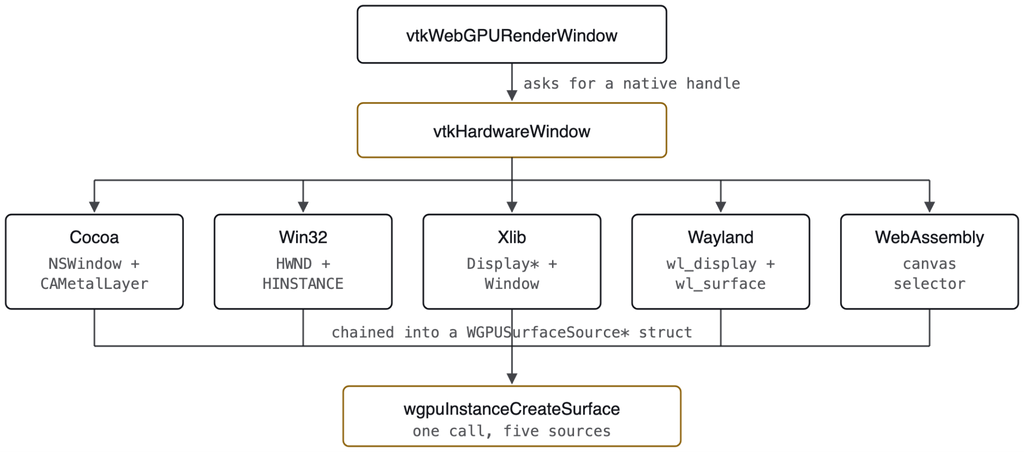
The platform difference is confined to which struct gets chained onto the surface descriptor. Everything above and below that line is shared.
Lifecycle
Applications do not need to instantiate a hardware window manually. Instead, creating a render window operates as usual, managing the setup behind the scenes.
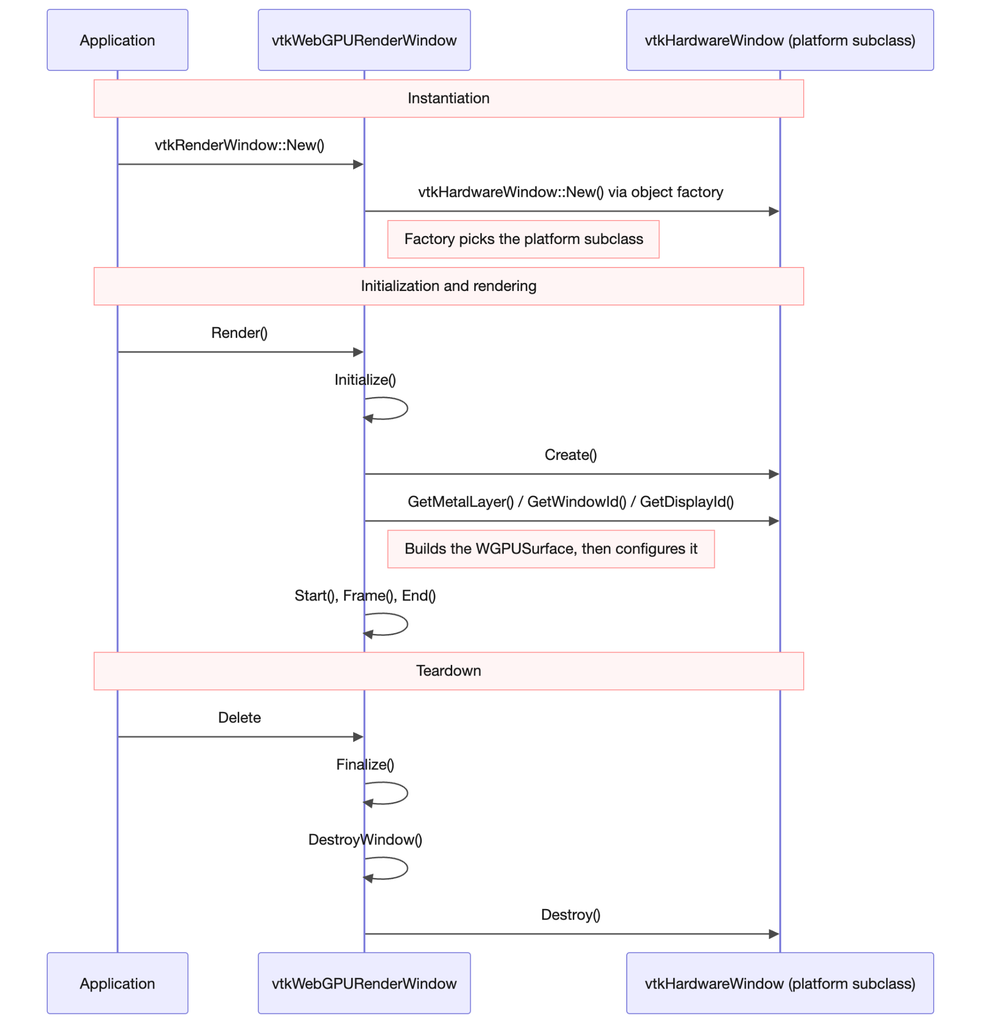
When Initialize() runs, the render window sets up the underlying native window, grabs its handle, constructs a WGPUSurface, and calls wgpuSurfaceConfigure to set up the dimensions and color format. (Since WebGPU replaces swapchains with surface configurations, this step binds everything together.) Teardown unwinds the process step-by-step: Finalize() calls DestroyWindow() to free GPU resources, the hardware window’s Destroy() method closes the OS window, and reference counting cleans up remaining references.
Example
To see VTK’s decoupled architecture in practice, consider a scene from TestMixedGeometry.cxx. This example renders a mixture of geometry primitives—polylines, points, lines, a cone, and a 12-sided polygon—on a single canvas using the WebGPU backend. Despite the variety, the rendering logic remains straightforward and portable thanks to vtkHardwareWindow. Through VTK’s object factory, the system creates the appropriate native window for the current platform and prepares the WebGPU renderer to consume it. From there, the application constructs geometry using standard VTK sources and aggregates them into a single dataset:
vtkNew<vtkUnsignedCharArray> colorArray;
colorArray->SetName("color");
colorArray->SetNumberOfComponents(4);
colorArray->SetNumberOfTuples(append->GetOutput()->GetNumberOfCells());

std::array<vtkColor4ub, 4> colors = {
  vtkColor4ub(255, 99, 71, 255),   // Tomato
  vtkColor4ub(0, 255, 255, 255),   // Cyan
  vtkColor4ub(0, 255, 0, 255),     // Green
  vtkColor4ub(255, 255, 0, 255)    // Yellow
};

for (vtkIdType i = 0; i < colorArray->GetNumberOfTuples(); ++i)
{
  colorArray->SetTypedTuple(i, colors[i % colors.size()].GetData());
}
append->GetOutput()->GetCellData()->SetScalars(colorArray);
Standard VTK pipeline elements bring it all together:
vtkNew<vtkPolyDataMapper> mapper;
mapper->SetInputConnection(append->GetOutputPort());
mapper->SetScalarModeToUseCellData();
mapper->SetColorModeToDirectScalars();

vtkNew<vtkActor> actor;
actor->SetMapper(mapper);
actor->GetProperty()->SetPointSize(3.0);
actor->GetProperty()->SetLineWidth(2.0);

vtkNew<vtkRenderer> renderer;
renderer->AddActor(actor);
renderer->ResetCamera();

renderWindow->AddRenderer(renderer);

vtkNew<vtkRenderWindowInteractor> interactor;
interactor->SetRenderWindow(renderWindow);

vtkNew<vtkInteractorStyleTrackballCamera> style;
interactor->SetInteractorStyle(style);
style->SetDefaultRenderer(renderer);

renderWindow->Render();
interactor->Start();
The end result is a colorful, interactive visualization rendered through WebGPU, running seamlessly on any platform VTK supports—Windows, macOS, X11, Wayland, or WebAssembly—without modifying rendering code or window logic. This decoupled design isolates platform dependencies while keeping rendering logic completely portable.
vtkWebGPURenderWindow and vtk[Cocoa, Win32, Xlib, and Wayland]HardwareWindow. Cross-platform rendering of mixed geometry primitives using vtkWebGPURenderWindow and a factory-resolved vtkHardwareWindow, demonstrating decoupled surface creation across macOS, Windows, X11, and Wayland.
Offscreen: No Window At All
In VTK’s WebGPU backend, every frame is initially drawn into an offscreen color attachment before being presented to the screen. On headless systems or displayless environments, the pipeline runs normally—it simply skips that final presentation step.
You can configure offscreen behavior using vtkWindow's standard API, matching the familiar workflow from the OpenGL backend:
| ShowWindow | UseOffScreenBuffers | Result |
|---|---|---|
| on | — | Window and surface, presented |
| off | off | Window created, never mapped |
| off | on | No hardware window, no surface, no display required |
vtkNew<vtkRenderWindow> window;
window->SetSize(1400, 1050);
window->SetShowWindow(false);
window->SetUseOffScreenBuffers(true);
window->AddRenderer(renderer);
window->Render();

// window->GetHardwareWindow() == nullptr
vtkNew<vtkWindowToImageFilter> capture;
capture->SetInput(window);
capture->Update();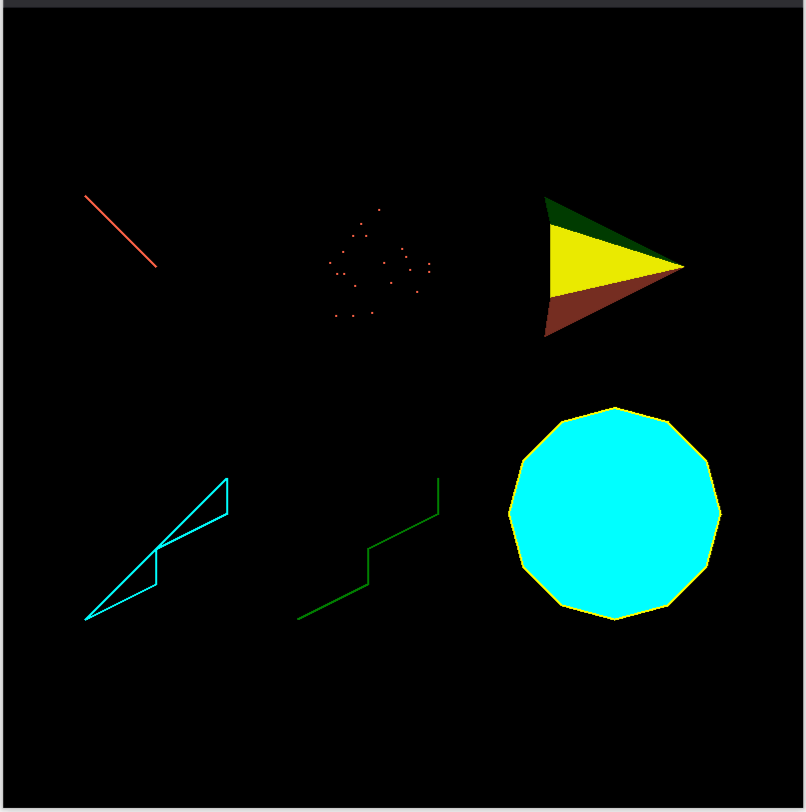
Rendered with no hardware window
Making offscreen rendering work smoothly involved addressing a couple of edge cases. First, ShowWindow wasn’t being passed down to the hardware window, meaning SetShowWindow(false) still displayed a window. Second, Frame() was exiting early whenever a surface was missing—before command buffers were flushed—which resulted in blank outputs instead of rendering into the available offscreen attachment.
Qt, and the inversion of ownership
Most scientific desktop applications embed rendering views directly inside full-featured GUI frameworks. Historically, embedding VTK into Qt meant bridging two frameworks that both wanted control over window handles and OpenGL contexts, often leading to tricky state management. Solutions like QVTKOpenGLNativeWidget and vtkGenericOpenGLRenderWindow helped by handing context creation over to Qt, but developers still needed to match surface formats across both libraries carefully.
By separating native window management from rendering logic, this friction disappears. Qt creates and manages the platform window as it would for any standard widget—handling resizing, DPI scaling, and destruction—while VTK simply receives the surface handle and uses it as a target. QVTKWebGPUWidget (located in GUISupport/QtWebGPU) implements this streamlined design as a standard QWidget subclass. VTKWebGPUWidget, also located in GUISupport/QtWebGPU, is the WebGPU-backed implementation of that arrangement. It is a QWidget subclass.
class VTKGUISUPPORTQTWEBGPU_EXPORT QVTKWebGPUWidget : public QWidgetclass VTKGUISUPPORTQTWEBGPU_EXPORT QVTKWebGPUWidget : public QWidget
It extracts the native handle directly from the Qt window, constructs a WGPUSurfaceDescriptor, and attaches it to the render window. Because surface creation is encapsulated behind a clean boundary, supporting Qt as a custom handle source required zero changes to the underlying render window code.
Where this leaves things
This update is primarily structural, ensuring existing application code remains completely compatible. If your app creates a vtkRenderWindow and invokes Render(), everything continues working seamlessly, and the OpenGL backend remains untouched. The main benefit is that native window management, surface creation, and core rendering are now clearly separated.
This clear separation delivers tangible improvements across the board: adding Wayland support required creating just a single new class without touching core backends, offscreen rendering became a natural flow rather than a special code path, Qt integration no longer requires managing context ownership, and WebAssembly targets—where the window is simply an HTML canvas—fit neatly into the same standard interface.
The practical consequences are concrete rather than dramatic. Adding Wayland support meant writing one class, not touching every backend. Off-screen rendering became the absence of a step rather than a parallel code path. Embedding in Qt stopped being a negotiation over context ownership. And the WebAssembly target, where the “window” is a CSS selector, fits the same interface as the other four.
To see the decoupled hardware window architecture in action, check out the examples and test cases available in the VTK codebase under Rendering/WebGPU/Testing/Cxx, such as TestMixedGeometry.cxx, and give the new WebGPU backend a try in your own applications.
Research reported in this publication was supported by the National Institute Of Biomedical Imaging And Bioengineering of the National Institutes of Health under Award Number R01EB014955. The content is solely the responsibility of the authors and does not necessarily represent the official views of the National Institutes of Health.