CMake: Making Hard Things Easy
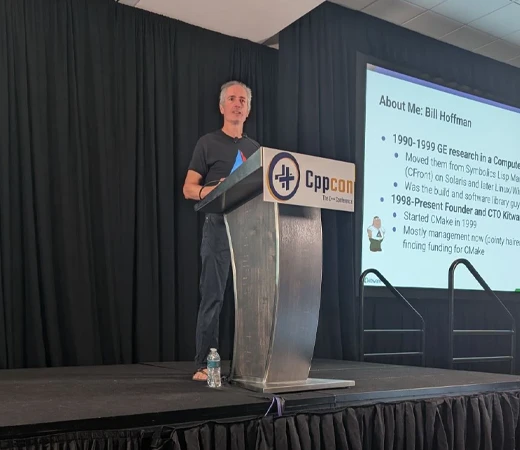
At CppCon 2026, I gave a talk called “CMake: Making Hard Things Easy” about how CMake handles build-system complexity so developers can focus on their software. This article shares practical takeaways from that talk. We started CMake for ITK 26 years ago. Researchers needed to use medical image segmentation and registration algorithms across different platforms without becoming experts in every compiler and linker. The idea was to capture that expertise in the build system so everyone could benefit from it. I wrote about those early days in Happy Birthday CMake!. Today, we take it for granted that we have build tools that can create static or shared libraries and link applications to them on Linux, Windows, or macOS.
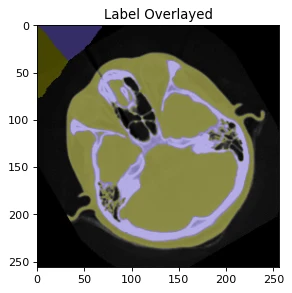
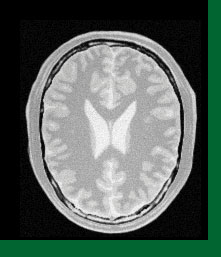
SimpleITK examples: head CT segmentation (left) and brain MRI registration (right). SimpleITK is an interface to ITK. Images: SimpleITK contributors / Insight Software Consortium.
Researchers wanted to work on problems like these: segmenting anatomical structures in a CT scan or aligning brain MRI images. Building a shared library meant dealing with details such as -Wl,-install_name,@rpath/libimage.dylib on macOS, /DLL /IMPLIB:image.lib on Windows, or -Wl,-soname,libimage.so.1 on Linux. CMake captures that knowledge so researchers can spend their time on the algorithms and the images.
The problems have grown since then. We need to distribute libraries to other projects, describe what goes into an application, and reduce the time developers spend waiting. My CppCon 2026 talk covered how CMake helps with that work. If your project already builds, here are a few capabilities that can make it work better.
Give CMake the information once
The target model lets you put a library’s requirements on the library itself. Suppose an image library has public headers and requires C++20. Applications that use it need the appropriate include directory and language support:
add_library(image STATIC image.cxx)
target_include_directories(image PUBLIC
  "$<BUILD_INTERFACE:${CMAKE_CURRENT_SOURCE_DIR}/include>"
  "$<INSTALL_INTERFACE:include>"
)
target_compile_features(image PUBLIC cxx_std_20)

add_executable(viewer viewer.cxx)
target_link_libraries(viewer PRIVATE image)
The viewer receives those requirements through its dependency on image. PUBLIC requirements apply to both the library and its consumers; PRIVATE requirements apply only to the target itself. When a public requirement changes, you update the library and CMake carries the change to its consumers. The same model lets an external project use an exported target without reconstructing its compiler flags.
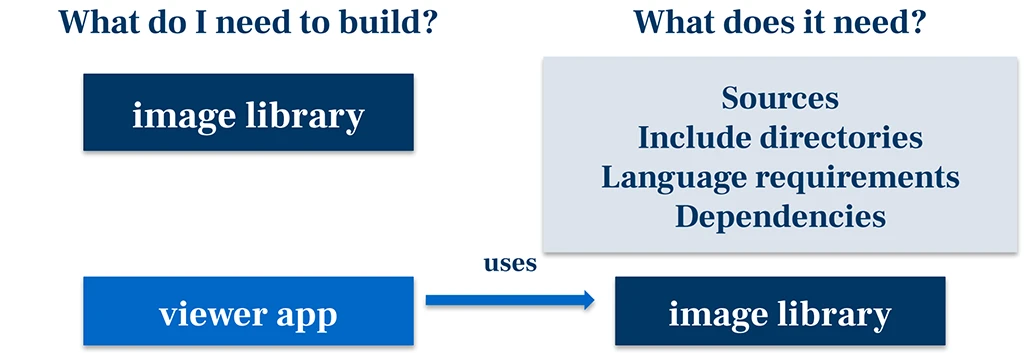
I covered this in Understanding the Importance of the Build System Target Model. Start with one library: put its requirements on its target, remove duplicated settings from a consumer, and check that it still builds. CMake’s File API also makes this project information available to IDEs as JSON. The information that drives the build can help your development tools too.
Make testing part of the build workflow
CTest gives your existing test executables and scripts a common way to run and report results. Register them with add_test, then run ctest --test-dir build --output-on-failure. You can keep the testing framework you already use. CDash collects results from different machines, compilers, and configurations so the team can investigate failures that do not appear locally. Start by registering one existing test and making it part of your normal workflow.
Make your library easier to consume
At CppCon 2023, Bret Brown and I called for a common package description for the C++ ecosystem. The Common Package Specification, or CPS, describes package components and their usage requirements in JSON. Our goal is for build systems, package managers, and other tools to exchange that information without interpreting another tool’s build language. A library author should be able to describe the library once. Matthew Woehlke and I explain the background in A Year Closer to Standard C++ Dependency Management.
CMake 4.3 removed the experimental opt-in for CPS support. If your project installs targets into an export set, you can publish CPS metadata alongside the existing package files your consumers still need:
install(TARGETS image EXPORT ImageTargets)
install(DIRECTORY include/ DESTINATION include)
install(PACKAGE_INFO Imaging EXPORT ImageTargets)
A separate project can consume the installed package with:
find_package(Imaging CONFIG REQUIRED)
target_link_libraries(viewer PRIVATE Imaging::image)
Here, Imaging is the package name and image is its component. Set CMAKE_PREFIX_PATH to the installation prefix if it is outside normal search locations. Try this with a small library and a separate consumer first; that catches assumptions that only work inside your source tree. Common Package Specification Is Out the Gate and the install(PACKAGE_INFO) documentation cover the details. The CPS specification repository is open for discussion and contributions.
Check what you are shipping
CPS describes how to consume a package. A Software Bill of Materials, or SBOM, records what went into the software you delivered. That inventory helps identify products containing a vulnerable library version and the third-party licenses you need to review. CMake generates the inventory; downstream tools and people perform the vulnerability analysis and license review.
CMake can generate SPDX documents during installation from existing export sets, or use install(SBOM) to define the scope explicitly and combine export sets. Both routes are experimental and require the opt-in for your CMake version. Generating SBOMs with CMake walks through the setup. Start with something you actually ship, then inspect the components, versions, relationships, and any missing metadata before relying on the document in your release process.
Debug the CMake code too
When configuration takes an unexpected path or a variable has the wrong value, CMake’s debugger lets you use breakpoints, stepping, variable inspection, and a call stack. In VS Code, use Microsoft’s CMake Tools extension with CMake 3.27 or newer. Set a breakpoint in your CMake code, then run CMake: Configure with CMake Debugger from the Command Palette. The debugging documentation covers the workflow. The next time you find yourself adding print statements, give it a try.
Find out where the time goes
When someone says the build is slow, what are they timing? Compilation and linking, or the whole workflow including configuration, tests, and installation? CMake instrumentation collects timing information across configure, generate, build, test, and install. A trace shows the individual operations contributing to the wait. It works with the Makefile, Ninja, and FASTBuild generators; the instrumentation manual describes the options.
See New CMake Instrumentation Feature Provides Detailed Timing of Builds for background. With CMake 4.3 or newer, add this to the top-level CMakeLists.txt; no experimental opt-in is needed:
cmake_instrumentation(
  API_VERSION 1
  DATA_VERSION 1
  HOOKS postGenerate postCMakeBuild postCTest postCMakeInstall
  OPTIONS trace
)
Then run your normal workflow:
cmake -S . -B build -G Ninja
cmake --build build
ctest --test-dir build --output-on-failure
cmake --install build --prefix "$PWD/stage"
After each requested hook, look in build/.cmake/instrumentation/v1/data/trace for a Google Trace Event JSON file. Open or save the trace before proceeding, since CMake retains the most recent trace. These hooks process each stage separately.
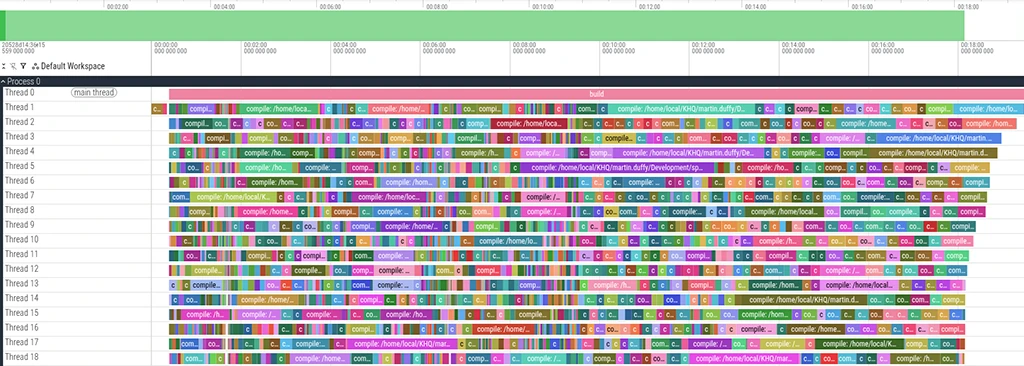
A trace gives you something specific to investigate. Perhaps one large source file leaves the rest of the machine idle near the end of compilation. Perhaps a custom command delays everything that depends on it. Those need different fixes, even if the total build time is the same.
Installation deserves a look too. It can include adjusting binary search paths, stripping binaries, finding runtime dependencies, and running project scripts. Independent work can benefit from parallel installation, provided the install rules tolerate subdirectories running independently.
If you already submit builds to CDash, you can view instrumentation data there. CDash 4.6 added interactive build flame graphs with command and target filters and memory information. See CDash Now Supports CMake Build Instrumentation. Use the current dashboard instrumentation instructions for setup.
What particularly interests me is using these measurements across a whole development team. Callbacks can send data to a central service: CMake passes an index of recorded operations, and your tooling handles uploading, storage, and reporting. Read or copy the indexed data before the callback returns, because CMake cleans it up afterward.
With hundreds of developers, a short delay repeated throughout everyone’s day can outweigh one unusually long build. Aggregate measurements can help you choose which workflow to improve and identify when a regression appeared. Keep machine types, configurations, and workloads distinguishable so comparisons mean something. Begin with a representative workflow, save a baseline, make a change, and measure again. Keeping that history helps you check whether the improvement lasts.
Avoid repeated work, then spread out the rest
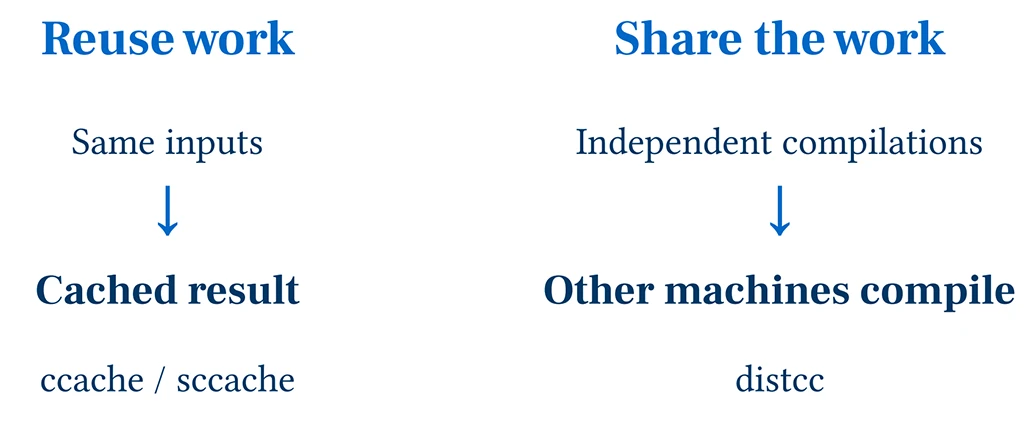
Before looking for more machines, check how much work you can reuse. A compiler cache such as ccache or sccache returns a previous compilation result when its inputs match. At Kitware, we use sccache with a shared Redis cache for Linux CI, letting one build benefit from work already done by another.
With sccache installed, a C++ project using Ninja can try it through CMake’s compiler launcher:
cmake -S . -B build-cache -G Ninja \
  -DCMAKE_CXX_COMPILER_LAUNCHER=sccache
cmake --build build-cache
sccache --show-stats
For C sources, set CMAKE_C_COMPILER_LAUNCHER too. Shared-cache configuration is separate. To test the cache, remove build outputs while keeping the cache, rebuild, and examine the statistics. An immediate second build usually does nothing because the outputs are already up to date.
Figure 4. A compiler cache reuses a result when the inputs match. Distributed compilation assigns independent work to other machines. Some tools, including FASTBuild, support both approaches.
Distribution lets other machines compile independent files. FASTBuild supports both distribution and caching, and CMake has a FASTBuild generator available since 4.2. Our FASTBuild article covers worker and cache setup.
Another route uses recc as the compiler client and BuildBox workers behind a remote execution service. The BuildGrid documentation describes one setup. I tried a small local version. It worked, and it was slower than the local build. Sending work across a network has a cost. We work with a customer using this approach at massive scale, but getting there takes engineering.
CMake RE from EngFlow is a commercial option with integration help and support. Choose using measurements from your project, keeping clean, incremental, and warm-cache builds separate. If linking or installation dominates, more compile workers will address only part of the wait.
Try modules without writing the build machinery
C++ modules require the build to discover imports and schedule compilation so module interfaces are available when needed. We worked with compiler vendors and the C++ tooling community on P1689, a common format for reporting those dependencies. CMake and the build tool use that information to put compilation in the right order. Our C++20 modules article describes how that work came together.
I found Kokkos on Are We Modules Yet?. I happened to know the developers, so I asked them about their experience. They reported build-time improvements of 12 to 21 percent. What stood out to me was how little build-system work they needed: a small change to their CMake files gave them access to modules support. They did not have to work out the compiler flags, process P1689 dependency information, or arrange for Ninja to update build dependencies as imports changed. The work across CMake, compilers, and build tools made that small change possible.
Are We Modules Yet? is adding more projects using modules, and I think CMake’s support is helping drive that adoption. When projects can try modules with a small change to their build files, more developers can explore the benefits. Try a small part of your project with a supported toolchain from the current CMake modules documentation, measure the result, and report problems.
Pick one thing to improve
You do not have to adopt every feature at once to get more from CMake. Start with something that causes trouble today: try an installed consumer if packaging is painful, inspect an SBOM if you need better information about a deliverable, or collect a trace if developers are waiting and nobody knows why. Make one change, check the result, and use what you learn to decide what to tackle next.
Each of these capabilities puts more of the hard work into tools that the whole community can use. That gives your team more time to work on the software you set out to build. The slides from my CppCon talk include more examples and background and are available as a PDF.
Thanks CMake community
Thank you to CMake’s users, contributors, and open source community for helping CMake grow over the past 26 years. Your feedback, bug reports, code, documentation, and shared experience help us understand what developers need and make CMake better.
A special thanks to Kitware’s customers, whose support makes much of this work possible. Funding development helps turn difficult build problems into capabilities the whole community can use. Help us keep that work moving forward: try these features, tell us what works and what needs improvement, contribute a fix, or work with Kitware to fund a feature your project needs. Every contribution helps make hard things easier for the next developer.