Improving Python Dependency Handling for 3D Slicer Extension Development
3D Slicer is a multi-platform medical image informatics and visualization application, and a sizable fraction of its functionality lives in extensions. Many of those extensions are written in Python, and many of them depend on third-party Python packages: PyTorch for deep learning models, scikit-image for filtering, nnUNet for segmentation, and so on. How those dependencies actually end up installed on a user’s machine has historically been left up to each extension developer to figure out.
The result is a patchwork. Some extensions catch ImportError at module enter time and call slicer.util.pip_install. Others trigger an install only when the user clicks some kind of “Apply” button. A few do version checking. A handful run pip in a background thread to keep the UI responsive while several gigabytes of CUDA wheels download. Each of those approaches is a sensible answer to the same set of questions, and each was independently rediscovered by a different developer.
This post describes recent work that turns that patchwork into a built-in toolkit, available now in the Slicer nightly preview builds (it will land in the next stable release). The new slicer.packaging module gives extension developers a single, well-documented place to specify, check, and install Python dependencies, with sensible defaults for things like progress dialogs, restart prompts, and non-blocking installs.
The cost of letting every extension figure it out
Python dependency handling sounds like a small piece of plumbing, but it has an outsized impact on the user’s first impression of an extension. If a user clicks “Apply” and the application freezes for several minutes with no feedback while a large package downloads, they will assume something is broken. If the install succeeds but the extension’s import was already cached at the older version from a previous session, they will hit a confusing error and assume something is broken. If a different installed extension has already pinned a conflicting version, they will hit a conflict and assume something is broken. The extension actually works in every case; it is the dependency layer that failed to communicate with the user, ultimately causing friction and hindering adoption.
A second cost is duplication. Multiple extensions independently grew custom installation logic with progress reporting, version checking, recursive selective-install code to dodge transitive dependency conflicts, and so on. SlicerMONAIAuto3DSeg, SlicerNNUnet, SlicerTotalSegmentator, and SlicerIDCBrowser each contain non-trivial dependency-management code.
How we approached it: looking at what 94 extensions already do
This work was started at the 44th NA-MIC Project Week in Gran Canaria, with collaboration from Andras Lasso, Steve Pieper, Sam Horvath, and Michael Halle. The main approach was to study what Slicer extension developers had already converged on.
We examined every Python extension in the Slicer extension index. That came to 94 extensions with non-trivial Python dependencies. For each one, we tagged its approach along four axes:
- Specification: how does the extension represent its requirements? (Inline strings? A
requirements.txt? Something else?) - Checking: how does it determine whether the requirements are already met? (Try-import? Real version check?)
- Triggering: what causes installation to start? (Module load? First “Apply” click? A dedicated button? User action via documentation?)
- Installing: how does the install actually happen? (
slicer.util.pip_install? An isolated environment? With a progress display? With blocking prevention?)
A handful of patterns emerged with a few interesting outliers. The outlier extensions doing real version checking, blocking prevention, or richer install displays, were the prototypes for the new toolkit. SlicerMONAIAuto3DSeg’s QTimer-based polling for non-blocking pip is the basis of the non-blocking implementation. SlicerIDCBrowser’s progress display shaped the design of the modal dialog. SlicerNNUnet and SlicerTotalSegmentator’s recursive selective-install code informed how we now handle transitive-dependency exclusions.
The result is the new slicer.packaging module. The full API reference is in the developer guide, and a tour of the most useful patterns lives in the Python package management section of the script repository.
Five functions that cover the common cases
Five functions cover most cases an extension developer will run into:
| Function | Purpose |
|---|---|
slicer.packaging.load_requirements(path) | Parse a requirements.txt into Requirement objects. |
slicer.packaging.load_pyproject_dependencies(path) | Parse [project.dependencies] from a pyproject.toml |
slicer.packaging.pip_check(reqs) | Are the requirements already satisfied? |
slicer.packaging.pip_install(...) | Install, with various modes and hooks. |
slicer.packaging.pip_ensure(reqs, requester="...") | High-level workflow: check, prompt, install with progress, and offer restart if needed. |
pip_ensure is the one to reach for first. It folds the three most common steps (check what is missing, ask the user, install) into a single call, and it handles the case where the user just upgraded a package that was already loaded into the running Slicer session and needs to restart the application.
The existing slicer.util.pip_install and slicer.util.pip_uninstall continue to work; they are now thin wrappers around slicer.packaging. Existing calls that previously gave no UI feedback now show a modal progress dialog by default, which is a free upgrade for many extensions without any code changes.
How to use these functions in Slicer today
If you have a recent Slicer preview installed, you can experiment with the new APIs in the Python console right away. Here are some patterns you can try.
Check whether a requirement is satisfied:
import slicer.packaging
slicer.packaging.pip_check("numpy>=1.20")        # True
slicer.packaging.pip_check("numpy>=99999.0")     # False
slicer.packaging.pip_check("nonexistent-pkg")    # False
pip_check is implemented in pure Python on top of importlib.metadata. That means it is fast enough to call frequently. See the pip_check API reference for the supported input forms (string, list of strings, Requirement, list of Requirement).
Install something with a progress dialog (new defaults):
slicer.packaging.pip_install("scikit-image")
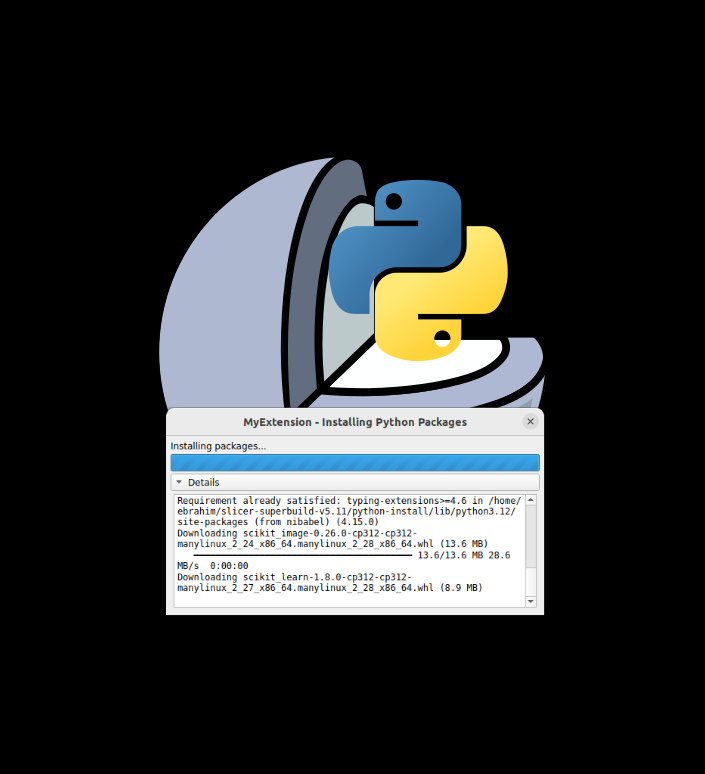
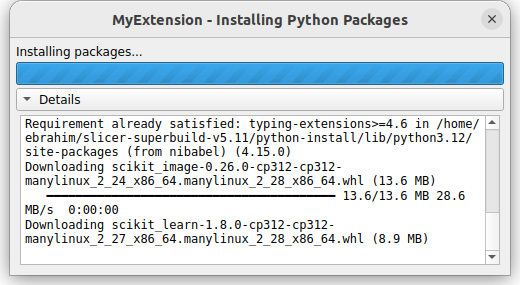
The dialog has a collapsible “Details” panel that streams the live pip log. If the install fails, an error dialog appears with the full pip log accessible under “Show Details”.
Install in the background while keeping the UI responsive:
slicer.packaging.pip_install("scikit-image", blocking=False)
The status bar shows pip output as it streams in, and slicer.packaging.isPipInstallInProgress() lets you guard against starting a second install while the first is still running. You can also pass logCallback and completedCallback for fully custom UIs. See the pip_install API reference for the full list of parameters, including constraints, no_deps_requirements, and skip_packages.
The recommended high-level call:
import slicer.packaging
slicer.packaging.pip_ensure("scikit-image>=0.22")
import skimage  # safe now
If scikit-image is already at a satisfying version, this returns immediately with no dialog. If it is not, the user sees a single “install these packages?” prompt, then the progress dialog, then (if anything that was already imported got upgraded) a “restart recommended” prompt with the affected packages and their old and new versions. See the pip_ensure API reference for the full list of parameters.
The full set of patterns is in the Python package management section of the script repository, including the constraints, no_deps_requirements, and skip_packages parameters for the cases where pip’s default resolution is not what you want.
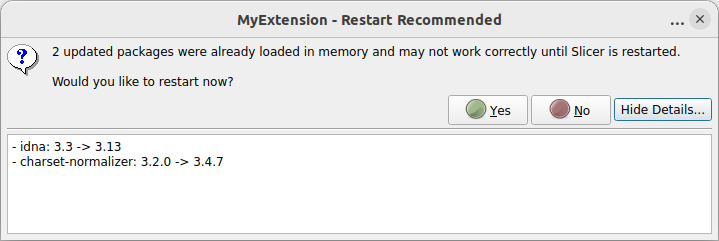
pip_ensure detects that an upgraded package was already imported in the current session, it offers a restart so the user does not silently keep using the old version.What extension developers should do now
The recommended pattern for a new extension is:
- Put a
requirements.txtnext to your module’s main script (typically underResources/). - At the point where the dependencies are actually needed (typically the body of
onApplyButton, not the top of the module file), callslicer.packaging.pip_ensure(...)and then import the dependencies. - For type checking and IDE support, declare imports under
if TYPE_CHECKING:at the top of the file.
Concretely:
from typing import TYPE_CHECKING
if TYPE_CHECKING:
    import skimage

# ...

class MyFilterWidget(ScriptedLoadableModuleWidget):
    def onApplyButton(self):
        import slicer.packaging
        reqs = slicer.packaging.load_requirements(
            self.resourcePath("Resources/requirements.txt")
        )
        slicer.packaging.pip_ensure(reqs, requester="MyFilter")
        import skimage
        # ... do the real work
Three things to notice:
- Imports of third-party packages happen after
pip_ensure, not at the top of the file. This way, the module loads cleanly even when the dependency is not yet installed, and the install happens only when the user actually exercises the feature. pip_ensurecan be called every time. If the requirements are already satisfied it returns immediately without prompting or installing anything, so calling it on every button click is safe and cheap; there is no need to cache a “did we already install?” flag in your widget.requesteris a string that shows up in the install prompt and the progress dialog title bar, so the user always knows which extension asked for the install. Use the user-facing extension name.
If your extension already keeps a pyproject.toml for other tooling, you can keep dependencies in its [project.dependencies] table and call slicer.packaging.load_pyproject_dependencies(...) in place of load_requirements. Both loaders return the same Requirement objects, so the rest of the pattern is unchanged.
To make this pattern discoverable, the scripted module template shipped with Slicer has been updated. When you generate a new module with the Extension Wizard, you now get:
- A blank
Resources/requirements.txtready for you to fill in. - A commented-out
pip_ensureblock at the top ofonApplyButtonthat you can uncomment and adapt.
For existing extensions, migrating is mostly a one-line swap. If you currently do something like:
try:
    import skimage
except ImportError:
    slicer.util.pip_install("scikit-image")
    import skimage
then a more user-friendly version is:
import slicer.packaging
slicer.packaging.pip_ensure("scikit-image>=0.22", requester="MyExtension")
import skimage
A more complete walk-through is in the Python FAQ and the script repository.
Future directions
This work was long-needed, but it’s just a start. Several pieces of needed follow-up work remain:
Integration with uv. The astral-sh/uv resolver is dramatically faster than pip for both checking and installing, and has features that pip does not have built-in: lock files, workspaces, and the ability to roll an environment back to a previous snapshot. Bringing uv into Slicer would unlock several things at once: faster installs, a way to compute one consistent environment across all installed extensions instead of resolving each one in isolation, and (with lock-file rollback) a way to restore a clean Python environment between extension tests. There is a prior PR #8181 that already worked out how to bundle uv with Slicer.
Virtual environments per extension. Sometimes an extension needs a very specific environment that conflicts with what is already installed, for example a particular CUDA build of PyTorch, an older pin of a package, or an entire alternative ML stack. The right answer for that case is probably per-extension virtual environments, in the spirit of pipx or uv tool, with a thin wrapper that makes them feel as convenient as slicer.util.pip_install. This would also resolve the recurring problem of conflicts between the dependency requirements of different extensions installed side-by-side.
A Slicer-side constraints file generated from the build configuration. The constraints parameter on pip_install already lets a caller pass a pip constraints file so an extension can pin a particular version of a transitive dependency. The principled long-term answer to the kinds of conflicts that motivate skip_packages is for Slicer itself to ship a constraints file generated from the versions of the packages it bundles (SimpleITK, requests, the matching PyTorch build via SlicerPyTorch, and so on) and to apply it to every install by default. With that in place, pip’s own resolver protects Slicer’s core environment, and extension developers stop needing to hand-curate skip lists.
A canonical place to declare dependencies. Right now each extension declares its own dependencies inside its own module. If Slicer also knew about those declarations at the project level, dependency resolution could be done once across all installed extensions instead of one extension at a time, which would make conflicts visible upfront rather than as a surprise at install time. This naturally pairs with the uv workspace feature.
Update-checking utilities. SlicerIDCBrowser goes through the effort to ask “is there a newer version of this package available?” without blocking the UI. That capability is useful, and is a natural future addition to the pip_* family.
Availability
slicer.packaging is available now in the Slicer nightly preview builds and will be included in the next stable release. The implementation is in PR #9010, the API reference is at slicer.readthedocs.io, and worked examples are collected in the Python package management section of the script repository.
If you maintain a Slicer extension that needs to handle Python dependencies, please try slicer.packaging against your use case. The fastest place to give feedback is the Slicer discourse forum.
About Kitware
Kitware is a leading provider of open-source software solutions for the medical imaging community. We collaborate with academic, clinical, and industry partners on projects that span data acquisition, image processing, machine learning, visualization, and clinical translation, including the development and stewardship of 3D Slicer. Our Slicer offerings include custom development, training, and maintenance packages. If your team is working on a Slicer-based tool and would like help with architecture, dependency strategy, deep learning integration, or anything else along the way, please reach out at https://www.kitware.com/contact/.
Acknowledgements
This work is supported by the National Institutes of Health under Award Number 1R21MH132982. The content is solely the responsibility of the authors and does not necessarily represent the official views of the National Institutes of Health.